

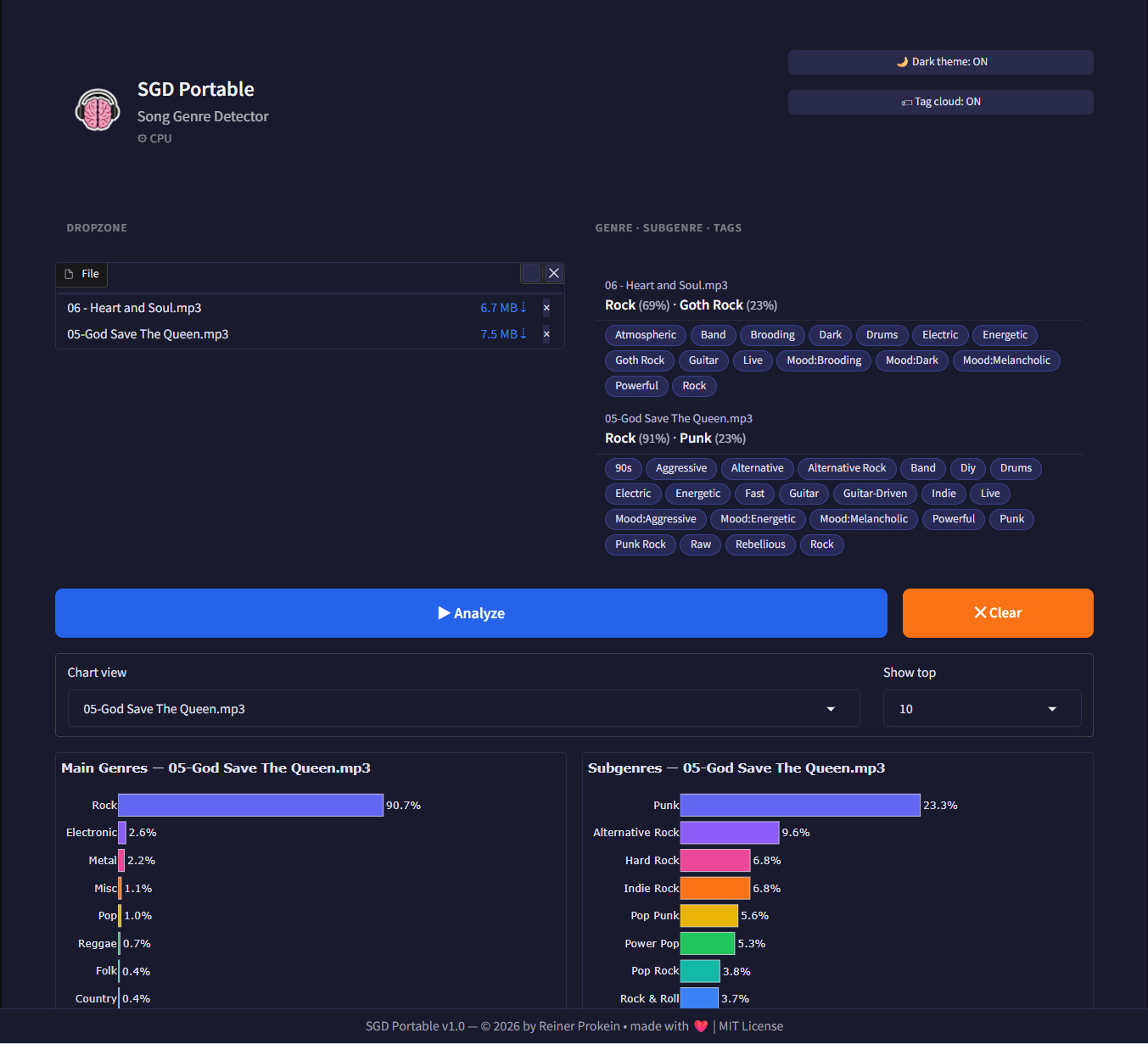
SGD Portable is a self-contained, portable web interface that lets you classify music genres using the powerful MAEST model. And displays some tags fitting to the detected music styles.
It is portable, and easy to remove. Everything installs and runs in a virtual environment. Download the zip file, click at the bat file to start the install process. And when done it opens in a browser windows where you can then drop audio files to analyze them.
The project is open source under MIT license, and can be found at Github too: https://github.com/ReinerBforartists/sgd-portable
Release video at Youtube:
https://www.youtube.com/watch?v=Vvq__rRjRs4
⇩ Downloads
20.03.2026 – Version 1.0.2
CPU version requires 2 gb of free disk space. The Cuda version needs 6Gb of free disk space – 32kb
✨ What It Does
Simply drag & drop any audio file (MP3, WAV, etc.) into the browser interface, and SGD Portable will analyze it and show you:
- 🎸 Main genre predictions
- 🔍 Detailed subgenre classification (MAEST contains over 400 styles!)
- ☁️ Interactive tag cloud visualization
- 📊 Beautiful charts showing confidence scores
🎯 Key Features
📦 Truly Portable – Everything in one folder – embedded Python, all dependencies included
⚡ Two Versions – CUDA (GPU accelerated) or CPU – you choose what fits your hardware
🖥️ No Setup – Double-click start_cpu.bat or start_CUDA.bat, wait for the download to finish, and the web UI opens automatically
🎚️ Beautiful UI – Gradio-based with dark/light theme, file upload, charts, and tag cloud
🧠 Smart Model – Uses MAEST – trained on millions of tracks, knows over 400 genres
🚀 Get Started in 3 Steps
- Download the right ZIP for your system (CUDA or CPU)
- Extract the folder anywhere – USB stick, desktop, whatever
- Double-click
start_cpu.batorstart_CUDA.batand wait for your browser to open
That’s it! The first run downloads Python, Pytorch etc, the AI model (~350 MB), and then you’re ready to analyze.
Note that it takes a few moments until everything is downloaded and installed. The CPU version has 2 Gb in size after everything is installed, the CUDA version 6 Gb.
⚠️ A Quick Note
The MAEST model itself is CC BY-NC 4.0 – so non-commercial use only. But the tag cloud and tooling are MIT licensed, so feel free to build on them!
Also – AI makes mistakes! Always trust your ears first 😉
🙏 Credits & Thanks
- MAEST model by MTG-UPF (Universitat Pompeu Fabra)
- Built with Gradio, PyTorch, and lots of ☕
Made with ❤️ by Reiner Prokein
History
20.03.2026 – release version 1.0.2
Made the Cuda version quit installation when there is no Cuda compatible device found. And fixed a bug in the charts. Sometimes a genre had two bars.
19.03.2026 – release version 1.0.1
There was a cosmetic problem with the download values displayed at install. Now the values are more realistic.
18.03.2026 – release version 1.0.0
This tool is one of those crazy ideas that I had for a while. Why not develop a tool that gives you back the genre of a song and gives you some tags to it too? That was always the part that I was in trouble with when releasing my own songs: The genre, and the tags.
So I fired up ChatGPT in early February and started just for fun to ask, “Hey, how can this be done?” Before I counted to three, I was deep in the matter and started to develop this tool with Gradio. LLMs were a big help here. But it needed more than one correcting hand. Always amazing how ChatGPT and friends does everything to prevent giving the correct result even with the most detailed inquiry. But at the same time there are these rare moments where AI really does what you ask it for.
The base code itself, up to the point to add a model and click the analyze button, was surprisingly quickly developed within two days. The time-consuming part was then the model, and as usual the finishing touches.
One of the biggest trouble points was the AI model itself. When I started my research I only got pointed at a model from 2016 with 16 genres. Well, it worked, but it was too limited for my needs. I haven’t found anything better at that point. And so I started some experiments to train my own model. Better than these sixteen genres should always be possible, I thought. And there are enough free audio resources available to train your model.
Well, I have then set up a virtual training environment on my Linux installation, and tried nearly every available method to reach the goal. Starting with the weakest one, MFCC, going through the advanced possible solutions like CNN and PANNs. Always in hope that now it should finally give a good result. I started with the smallest FMA set first, which had seven gigabytes. In the end I must have had around 400 GB material from FMA (Free Music Archive) and Jamendo. And the result was still simply arbitrary.
Here’s a list of the training methods I tried along the way. Don’t worry, before the research I didn’t know them either:
MFCC-based classification — simple audio features (mel-frequency cepstral coefficients) directly into a classifier without a pre-trained model. Unusable. The model was basically throwing dice.
CNN + custom Mel spectrograms — self-trained from scratch, 10-25% confidence. A bit better than throwing dice. But still unusable.
OpenL3 + MLP — trained on music, theoretically the best choice, but incompatible with my chosen Linux environment. So I was not able to try it out.
PANNs CNN14 + MLP (frozen) — PyTorch, GPU runs, but t-SNE shows complete chaos — embeddings don’t differentiate genres at all, 19% accuracy.
MusicNN — requires NumPy < 1.17 and TensorFlow, again incompatible with Python 3.12. So I didn’t try this method neither.
MERT — PyTorch, Python 3.12 compatible, specifically trained on music. The results were completely random.
PANNs Fine-Tuning — Training CNN14 end-to-end instead of using a frozen embedder. Another possible solution. But I did not try out this last method anymore. I realized that a self-trained model will not lead me to my goal. Not enough clean training data.
So that was quite an odyssey training my own model. I learned a lot on my way, but in the end I had to give up this approach.
I was still not willing to easily give up this project though. So I did research again. And this time I got a useful answer. First I tried Essentia from Onyx. But again I got no really useful result. The last model I tried, Maest, then finally gave a useful result. And it is trained on millions of correct labeled songs instead of a few tens of thousands from my approach. The caveat is that Maest has a non-commercial license. So you are not allowed to use its result commercially. But you can use the tag cloud. This is my work and not derived from Maest. And non commercial is nowadays more than enough for my needs.
All in all, this project was a bit more than four weeks of fun. I know now how i can train my own AI model. And I finally know what genres my own songs are!
Enjoy
– Reiner