

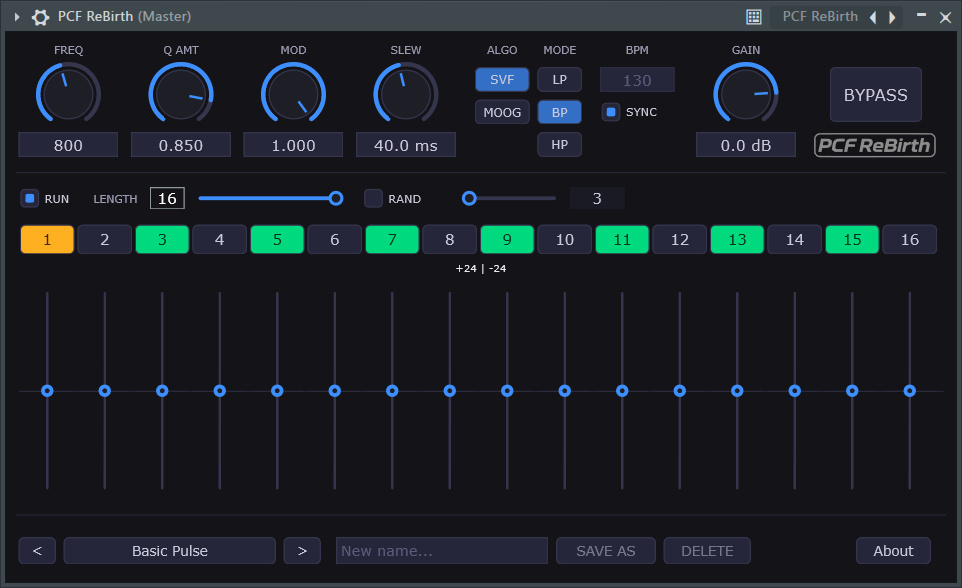
✨ PCF ReBirth is a subtractive VST3 filter inspired by the legendary PCF module from ReBirth RB-338. It recreates the distinctive pattern controlled wah wah character that gave ReBirth so much of its movement and attitude by combining a highly flexible 16-step sequencer with sophisticated filter emulations to create evolving, rhythmic textures.. From subtle rhythmic sweeps to aggressive acid style modulation, PCF Rebirth brings that unmistakable sound into modern DAW workflows. It is the rebirth of the PCF filter.
The project is open source under MIT license, and can be found at Github too: https://github.com/ReinerBforartists/pcf_rebirth
Watch the release video at Youtube:
https://www.youtube.com/watch?v=Wd53Yez85qo
⇩ Downloads
30.07.2026 – Version 1.0.6
The zipfile contains the VST3 files. For Linux and Mac installation have a look at the Installation section.
Please uninstall older versions and do a rescan then. The file name has changed.
✨ Key Features
– **16-Step Sequencer**: Per-step pitch, gate, accent, and slew control
– **Dual Filter Engines**: Clean SVF & warm Moog Ladder emulation
– **6 Filter Modes**: LP, BP, HP per engine
– **Dynamic Modulation**: Cutoff & resonance driven by step accents & gate velocity
– **Flexible Patterns**: Real-time length adjustment (1–16), DAW sync, independent run
– **Preset System**: Factory library + local user presets with full DAW automation
📥 Installation
The windows installer should be self explaining.
In case you prefer the zipfile, or want to use the VST3 at MacOS or Linux:
1. Download the Zipfile. Extract it.
2. Place the VST3 plugin in the official plugin folder:
– **Windows**: `C:\Program Files\Common Files\VST3`
– **Linux**: `/usr/lib/vst3/` or `/usr/lib64/vst3/`
– **macOS**: `/Library/Audio/Plug-Ins/VST3` or `Components` (AU)
Note that since this plugin isn’t notarized by Apple, macOS will quarantine it after download. Open Terminal and run:
bash xattr -dr com.apple.quarantine /Library/Audio/Plug-Ins/VST3/PCF_ReBirth.vst3 (adjust the path if you used ~/Library/…)
3. Rescan plugins in your DAW
🚀 Quick Start
1. Set tempo (manual or `SYNC` to DAW transport)
2. Activate steps & set pitches using the vertical sliders
3. Choose filter engine & mode, then shape tone with `Freq`, `Q Amt`, & `Env Mod`
4. Adjust pattern length (1–16), tweak `Slew` for gate shaping, press `RUN`
5. Load presets or save your own with `SAVE AS`
In case the plugin crashes on Windows, install the latest redistributable files from Microsoft
https://aka.ms/vs/17/release/vc_redist.x64.exe
📜 License & Credits
This project uses a dual-licensing approach:
- Source Code: Licensed under the MIT License. You are free to use, modify, and distribute the source code.
- Compiled Binaries: Because this project is built using the JUCE framework, the compiled VST3 binaries are distributed under the GNU GPL v3.
Made with ❤️ by Reiner Prokein
✨ Motivation
Back in the day, I was completely addicted to ReBirth RB-338. Long before I started working with full DAWs, it was one of the tools that pulled me into electronic music production. One thing I especially loved was the sound of the PCF filter and its signature wah wah movement.
When I moved on to modern production environments, that particular character was something I always missed. I tried countless filters and plugins over the years, but nothing really captured the same feel and behavior.
With the help of modern AI assisted development, I finally decided to recreate it myself and bring that classic sound back to life as a dedicated VST3 plugin.
✨ History
30.07.2026 – Version 1.0.6
Version 1.0.6 is a small maintenance release. It fixes some small cosmetic inconsistencies under the hood. As a user you will experience no differences to Version 1.0.5.
And we have an updated Readme. A user reported a crash at Windows 10, which was caused by missing / outdated Microsoft Redistributables. The readme covers this point now, and points you to the download.
02.07.2026 – Version 1.0.5
Bugs, we haz it. The random toggle did not retain its status when the VST was closed and reopened in the DAW.
01.07.2026 – Version 1.0.4
This is a follow up for version 1.0.3. After being able to go down to 1 bpm i noticed that the glide doesn’t fit by any means. The glide value was hardcoded, with a sweetspot around 120 bpm. It is now visible as an edit box, percentage-based and aligned with the BPM. Means no matter if you have 1 bpm, 120 bpm or 500 bpm, the glide will have a length of 20% of it ( or whatever value you choose). The range goes from 0% up to 1000%, but note that you might not hear any difference anymore after 500%, and that the glide effect will become muddy the higher you go.
29.06.2026 – Version 1.0.3
This version changes the default values for the bpm. I was unhappy that i couldn’t use it as a very slow effect. Now i can. The defaults for bpm goes now from 1 up to 500.
11.06.2026 – Version 1.0.2
This version finally fixes the Mac version. This one was a challenge since i don’t have a Mac. And Github Actions is everything but easy to convince. A big thanks goes to m483zip, who helped me to resolve the issue. Have a look at the readme, there is now more advice for Mac to find.
And this new release fixes an overlooked licensing issue. The code is linked against the Juce framework. Which is under GPL code. And so the compiled result needs to be under GPL too. I use now a dual licensing approach here. The binary is clearly GPL licensed. And the source code, which can also be compiled with other audio libraries, remains under the MIT license.
As a consequence, all former binaries will be deleted, since they would violate the GPL.
08.06.2026 – Version 1.0.1
Some always makes it through. The vst did not work on Mac tahoe. I forgot to compile with the correct universal settings. And i released a debug build instead of a release build. The release build is now much smaller and also a bit more performant.
EDIT 10.06.2026 , ah the fun of multi platform. The Mac and Linux versions were dysfunctional. I’ve reuploaded them, they should now work. Fingers crossed …
04.06.2026 – Version 1.0.0 – No further changes. The file is identical to version 0.9.2. But it has now version number 1.0.0
24.05.2026 – Version 0.9.2 . Some makes it always through. The update fixes a showstopper bug. The presets did not load anymore. And the new randomize feature was not stored in the presets.
23.05.2026 – Version 0.9.1. A few fixes and two new features. Randomize pitch in the seqeuncer, and a gain button.
20.05.2026 – initial release with version 0.9.0. Now comes the beta testing and polishing. You always overlook something.
First i toyed around with the graphical solutions like Hise, Reaktor and Pure Data. But the AI solutions was in big trouble here, since there was no code to write. And the usability of these graphical tools is everything but self explaining and good documented. I didn’t come really far. So i settled with the Juce C++ framework. Which then worked amazingly well. All in all, this development took just two amazingly short weeks. I love these modern times, which make it possible to bring ideas to life in such a short amount of time.
– Reiner